
If you're adding your plan, you’ll see something like the screen below when you click on Deliverables.
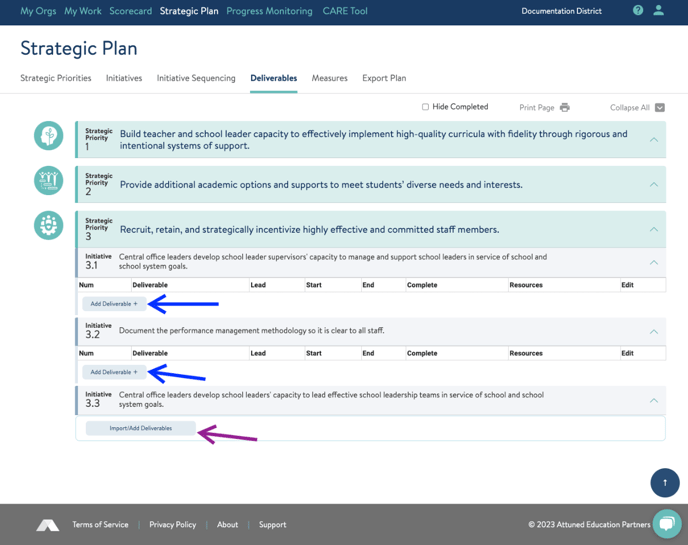 The first thing you’ll notice is that there are two ways to add deliverables. Any initiative with an Import/Add Deliverables button (purple arrow above) will allow you to import deliverables from the Deliverables Bank. Other initiatives (blue arrows above) will allow you to add deliverables manually. You’ll see the smaller button that allows you to type or paste in deliverables. Note that for standard initiatives, you can enter custom deliverables in addition to the standard ones.
If importing deliverables is an option, clicking the dark blue button will give you this: 
If you click import, you’ll immediately see the standard deliverables for the initiative. You can of course, add, delete, and edit deliverables after you have imported them. 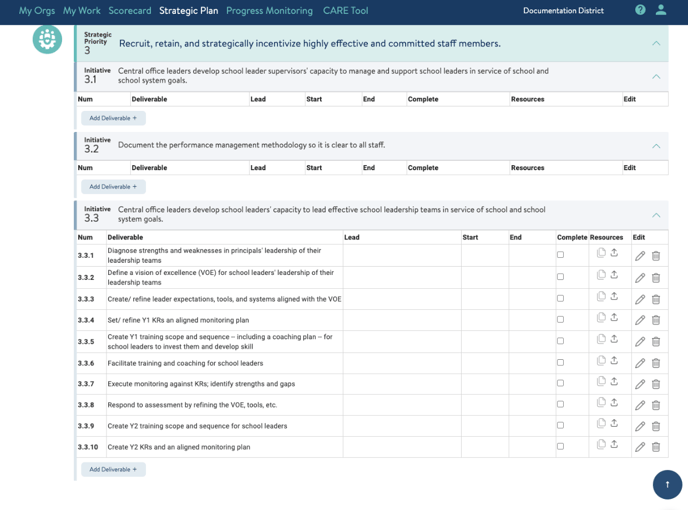
As with Strategic Priorities and Initiatives, use the pencil icon to edit a deliverable (you can see I’ve clicked the pencil for 3.3.2 below) and use the trash can to delete a deliverable. 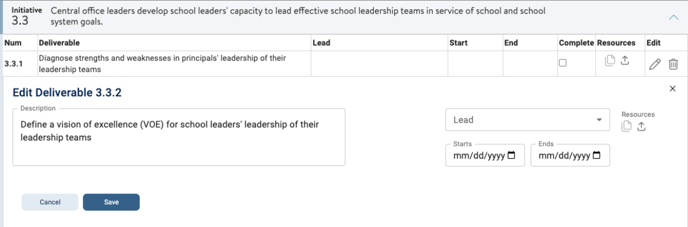
You’ll see there is no option to manually reorder deliverables. Deliverables, instead, will manually reorder themselves by due date when you change dates.
To mark a deliverable complete, simply click the checkbox in the complete column - and click it again to reopen it. You can see that I have completed 3.3.3 below. 
Resources
Resources are attachments to deliverables. Click the up arrow icon to add a resource. Once you have done so, you’ll see a number telling you how many resources are attached to a particular deliverable as shown below. 
To download and view a resource, click on the file icon - the one with the blue number - and you’ll be able to choose a file for download or delete the file using the black trash can icon. 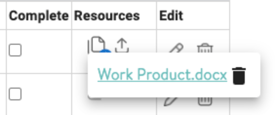
To learn about Measures next, read this help article here.
If you need support adding and managing deliverables, reach out to us! Send us a chat or email us at support@attunedpartners.com.