
After the Initiative Lead and the Reviewer have met to discuss an initiative, either one may mark the progress report closed.
To complete a progress report, open the report and click on the Report & Meeting Complete button at the end of the report. 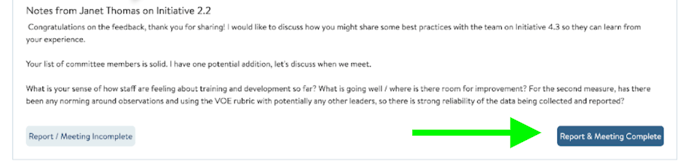
To close a report as incomplete - if the meeting never happened or the report is being abandoned for some reason - use the Report / Meeting Incomplete button instead. This should be infrequently used. You can see both of these buttons at the bottom of the screenshot above.
Both buttons will close the report and move it to the Progress Report Archive tab. In addition, the system will automatically create the next report.
If you need support archiving reports, reach out to us! Send us a chat or email us at support@attunedpartners.com.
Congratulations! You have completed a Progress Monitoring cycle!
