
In the week following your submission of a progress monitoring report, your Reviewer will be reading the details you provided and reflecting on the quantitative and qualitative data. They will also be compiling their feedback on the report to share with you via the progress monitoring tool ahead of your upcoming meeting.
During this time, the status of your report in the Progress Monitoring Tool will be Pending Reviewer ( 
 ). It is on or around this time that you and your Reviewer will plan to meet and discuss the initiative progress.
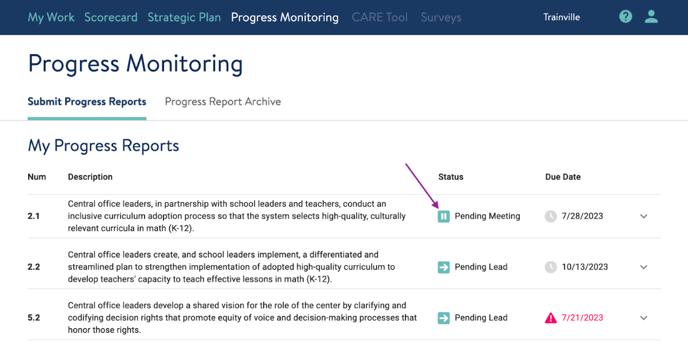
Before you and your Reviewer meet, be sure to look at the Reviewer’s report feedback. You can do this by clicking on the light green square with two white lines icon () on the My Work and/or My Progress Reports (purple arrow) screens. 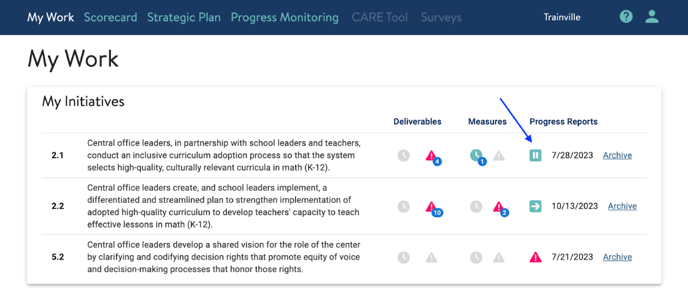
 Once you click on the initiative row, your Reviewer’s feedback can be found at the bottom of the report. Please make time to read the Reviewer’s feedback before you meet, and use that time to consider how you might further prepare for your conversation together.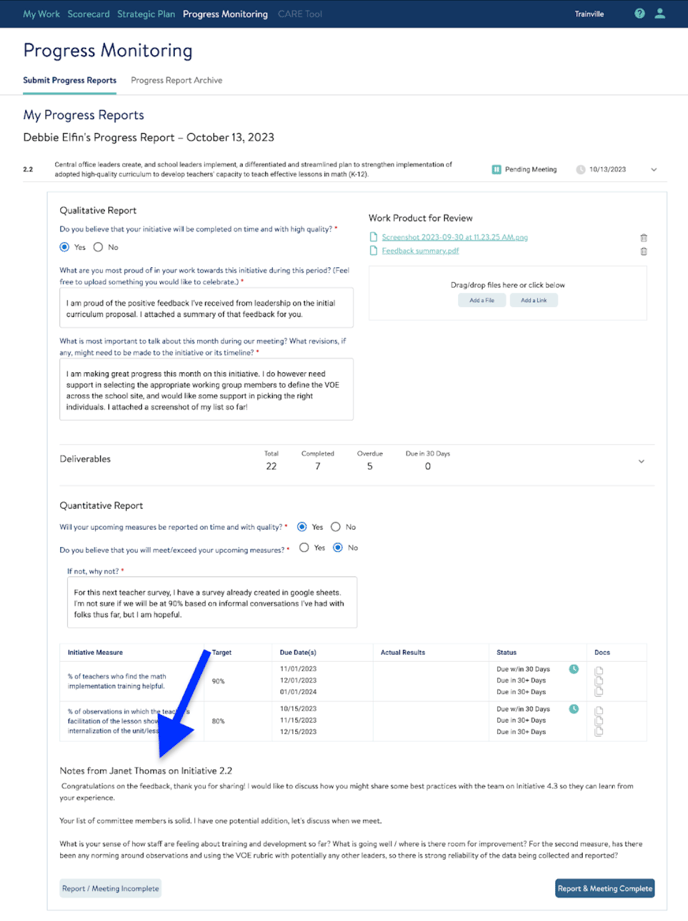
Initiative Leads can not respond to the Reviewer’s feedback via the Progress Monitoring Tool. The meeting between the Initiative Lead and Reviewer is the opportunity to align and discuss.
To learn how to archive a report, click here.
If you need support viewing feedback in your reports from your Reviewer, reach out to us! Send us a chat or email us at support@attunedpartners.com.